For you as the operator
One page that says what is wrong right now.
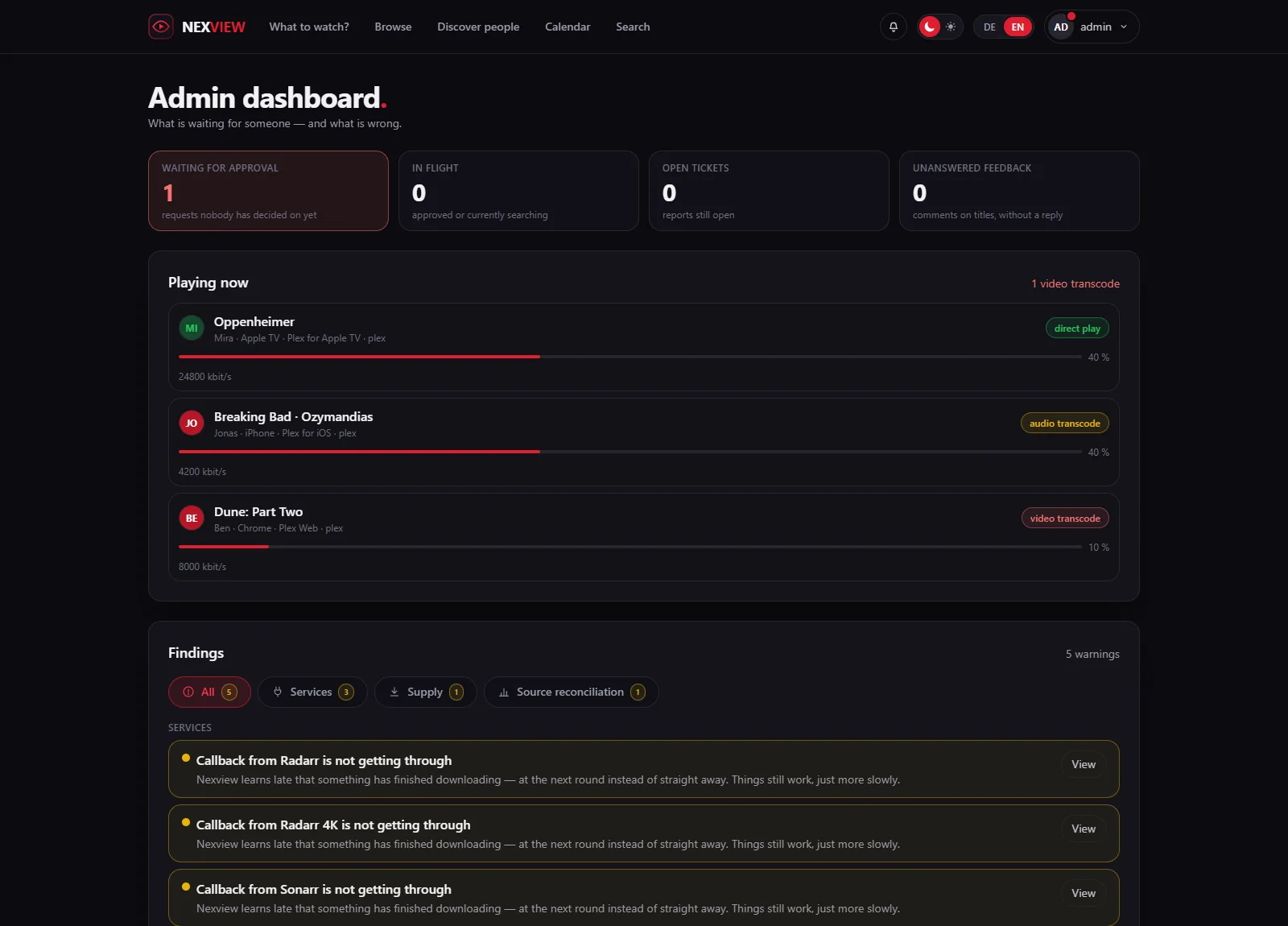
Nexview has plenty of settings pages, and none of them answers the question of whether everything is running. The admin dashboard does. It shows what is waiting for someone and what is broken, and every finding leads to the page where you fix it. It is for administrators only. The pictures show a sample installation with Mira, Jonas and Tom.
Admin dashboard
The one place that says what is stuck.
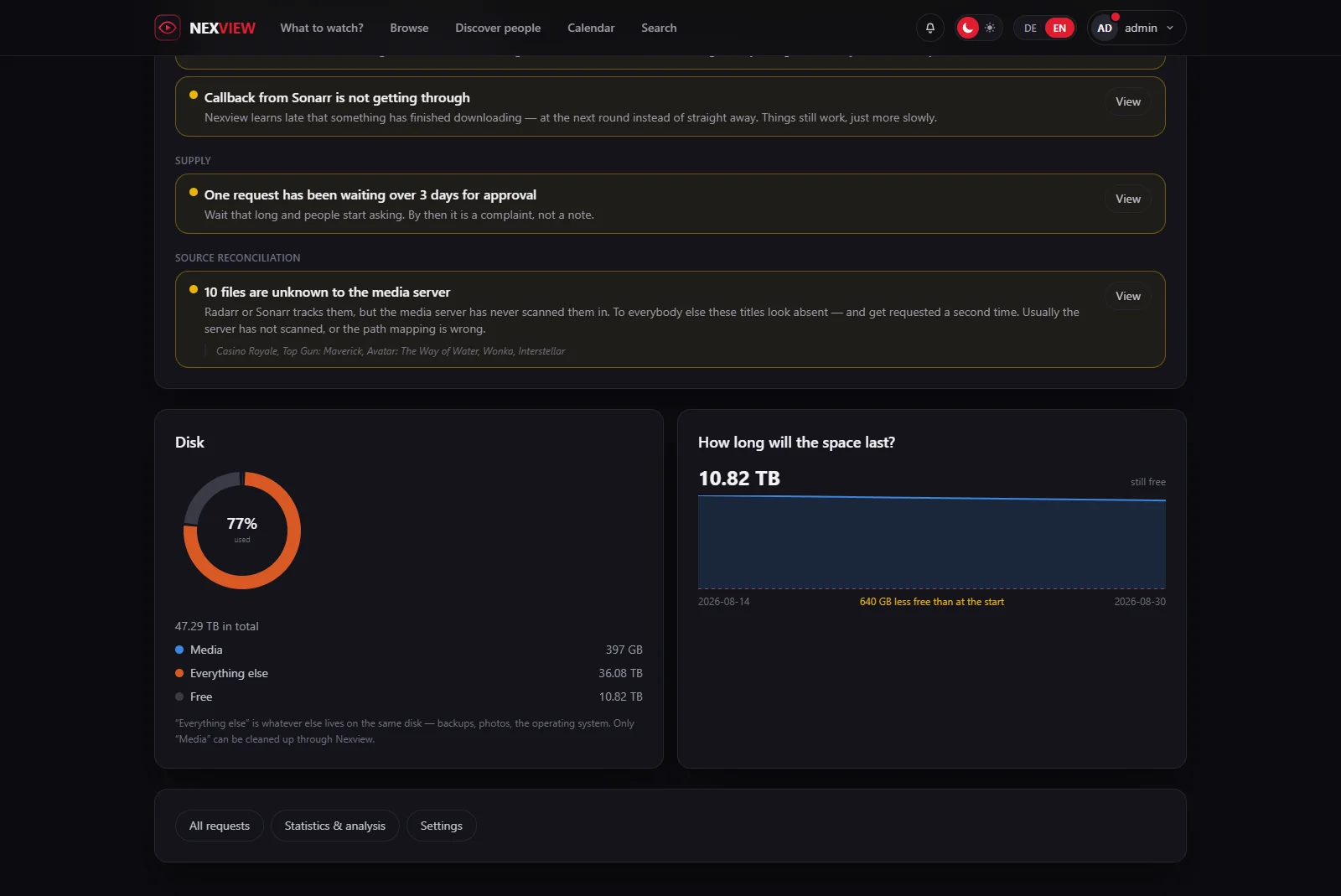
At the top are four numbers that call for action: “Waiting for approval”, “In flight”, “Open tickets” and “Unanswered feedback”. Below them come “Playing now”, the “Findings”, the disk and, at the bottom, three buttons: “All requests”, “Statistics & analysis” and “Settings”.
The page is not meant to be one more page with things on it. It is meant to make the existing ones unnecessary while nothing is going on. When something is, every finding leads to exactly the place where you put it right.
“Playing now” shows who is watching at this moment and disappears when nobody is. Every line on this page counts, and “nobody is watching” is not news.
The dashboard is for administrators and nobody else. An approver does not see it, because deciding on a request does not need the state of services or how full a disk is.
The core
A finding is an exception, not a state.
Whatever is always true is a statistic and belongs in the analysis. “You have 3,505 films” is always true, and nobody keeps reading a list in which the same thing stands every day.
If it does not apply, the check is silent
There is no “all fine” tick per check and no empty table. When every check is quiet, one sentence stands there: “Nothing found. All good.”
Every finding names the consequence
Not “callback silent for nine days”, but: “Nexview learns late that something has finished downloading, at the next round instead of straight away. Things still work, just more slowly.” Whoever reads that knows without background whether there is something to do tonight.
Three levels of severity, kept apart
An “Error” means something does not work. A “Warning” means it still works, but not for much longer. A “Note” means you could tidy up. Findings are listed in that order, the most urgent first.
The button next to it
“View” leads to where you fix it.
Every finding carries a target, and the target is never a bare page. Press “View” and you land on the tab where the problem sits. For a stuck request that is the filtered list of requests, for a silent instance exactly that instance’s tab, for stuck downloads the “Downloads” page.
A link that drops you on an overview page and leaves you to search costs more time than it saves. The addresses are readable for that reason: ?reiter=dienste&unter=sonarr tells a person where they will land. For the reconciliation of sources, “View” leads to the comparison table in which the affected titles are listed.
What is checked
Checks in six areas.
A check reads only what Nexview has already stored: its database and the measurements of the last round. It never asks over the network, so opening the dashboard puts no load on nexcrate, Radarr or Sonarr.
Services
Does the instance answer, and since when has it not? Is a newer version out? With Radarr and Sonarr, does the callback arrive, and what do they report about their own health? With nexcrate, it shows what nexcrate reports about itself. Messages from other programs stay in their English wording: it is their statement, not Nexview’s.
Supply
What has been searching for two weeks, what waits too long for approval, what failed several times within a week, which download needs your hand? With nexcrate there is also which open request is not reaching it.
Disk space
How full is a disk, and how fast is it filling? Reported per disk rather than per instance, so the same disk does not show up three times as a finding.
Library
Items that count towards an allowance but are no longer tracked by nexcrate, or by Radarr and Sonarr, and so can no longer be deleted through Nexview.
Source reconciliation
Where procurement, the media server and Nexview’s own books disagree. It is covered in detail on the statistics and analysis page.
Operations
Backup overdue, mails given up, many errors in the log, verbose logging still on, a new version of Nexview released.
The thresholds are built in and explained in the source. There is deliberately no further settings page for them: anyone who wanted to change these numbers would first have to experience them.
| Check | Reports from | Level |
|---|---|---|
| Request searching | more than 14 days after approval and release of the title | Error |
| Approval waiting | more than 3 days | Warning |
| Requests failed | 4 or more within 7 days | Warning |
| Instance not answering | 15 minutes of silence | Error |
| Disk full | 90 per cent used, an error from 95 per cent | Warning |
| Disk filling up | full in six weeks or sooner, worked out from at least 7 days of history | Note |
| File unknown to the media server | 10 files | Warning |
| Title without an identifier in the media server | 5 titles | Note |
| Title missing from one server | 25 titles | Note |
| Title with two years | 1 title | Warning |
| Automatic backup | schedule exceeded by one day | Warning |
| Error lines in the log | 20 within 24 hours | Note |
The most valuable check
Requests that have been “searching” for two weeks.
In the interface, “searching” looks like work, not like standstill. That is why the most common silent failure only comes to light when somebody complains: the indexer is gone or the download client has stopped, and the request has been sitting there for weeks.
Nexview keeps count. A request that has been on “searching” for longer than fourteen days is a finding, but only if the title has also been out for at least fourteen days. A film that is released in half a year rightly searches that long. A title without a release date counts, because otherwise a real failure on an old title could hide. The oldest case is named in the finding.
When the import jams
Stuck downloads get a page of their own.
A finding says that something in the queue needs a hand. The “Downloads” page says what. You find it in the menu under your name. Under “Needs you” stands every download that is not moving, with the reason in plain words, from a missing path mapping to an archive that has yet to be unpacked. “Running” and the “History” follow below.
With nexcrate
- nexcrate says for itself what is broken and what you may do about it. Nexview shows it and offers only the buttons nexcrate allows, such as “Try again”.
- What happens automatically with stuck downloads is decided by nexcrate. Nexview does not act here.
- A note from nexcrate is not yet a stuck download: only what nexcrate reports as a job for the operator fills the page and the finding.
With Radarr and Sonarr
- Nexview recognises around thirty reasons from the messages of Radarr and Sonarr, shows their English wording beside them, and offers the fitting buttons for each: “Try again”, “Import manually”, “Remove only” or “Remove and search again”.
- Everything goes through Radarr and Sonarr, so every download client they use is covered, with no further credentials.
- The automation for recurring reasons is off out of the box and applies per reason. It takes at most two steps per film or episode in 24 hours, never does a manual import, and tells you when a title keeps getting stuck.
Good to knowIf the same film or episode gets stuck three times in seven days, you are told, with the automation off and with nexcrate too.
Disk space
Three parts instead of two, and how long it will last.
The ring separates “Media”, “Everything else” and “Free”. “Used against free” would be half the truth: the same disk holds backups, photos and the operating system, and only “Media” can be tidied up through Nexview. Anyone who thinks they can free 36 TB because it shows as used will be disappointed.
Beside it stands the question that really matters: “How long will the space last?” “91 per cent full” does not say whether “soon” means next week or next year. Nexview measures once a day and draws a curve from it that reaches back up to 60 days.
While there are too few readings, it says so: “Too early for a curve”, with the number of daily readings still needed. A line through two points would not be information, only a claim.
Getting there
A button on the home page.
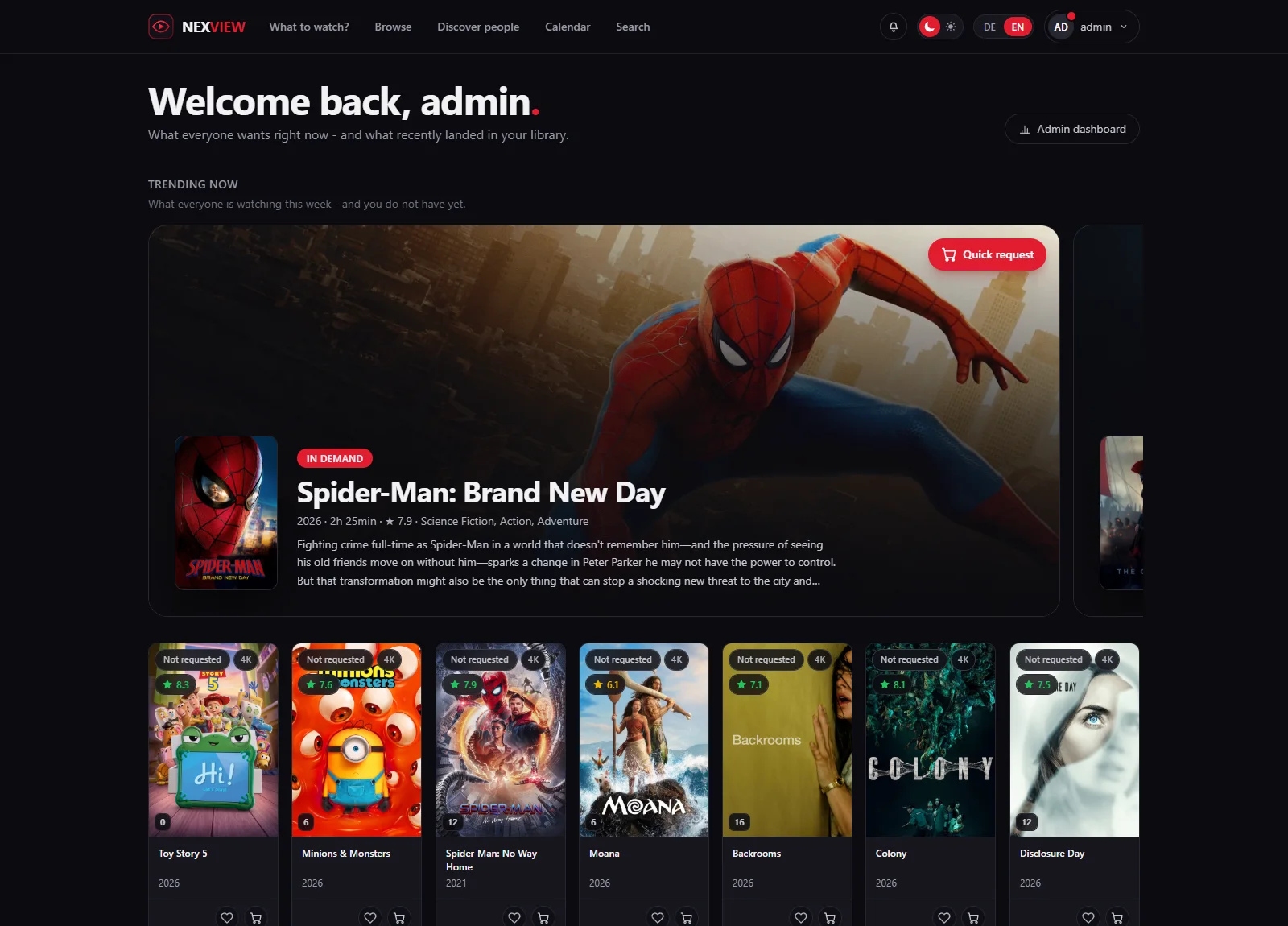
Administrators get an “Admin dashboard” button at the top right of the familiar home page. The same entry sits in the menu under your own name, with a red badge as soon as a finding reaches the “Error” level that you have not seen yet.
The badge goes back to zero once you have opened the dashboard. The finding itself stays for as long as it applies. Everybody else sees none of this, and the home page stays as it was for them.
For your start page
A tile for Homepage, Homarr and the like.
If you use a start board as your start page, you can have Nexview on it with real numbers: open approvals, findings by severity, the size of the library and the state of every instance. One call, one answer.
GET /api/v1/dashboard
Authorization: Bearer nxv_…
You create the token in your own profile, under “Account › Security › API tokens” with “Create token”. Tick “May only read”, and copy the token at once: it is shown exactly once.
The address sits under /api/v1, and that is a promise: as long as v1 is in the address, nothing disappears from this answer. The fields are listed on the API page. Ready-made snippets for Homepage and Homarr are in the repository, in docs/dashboard-tile.md.
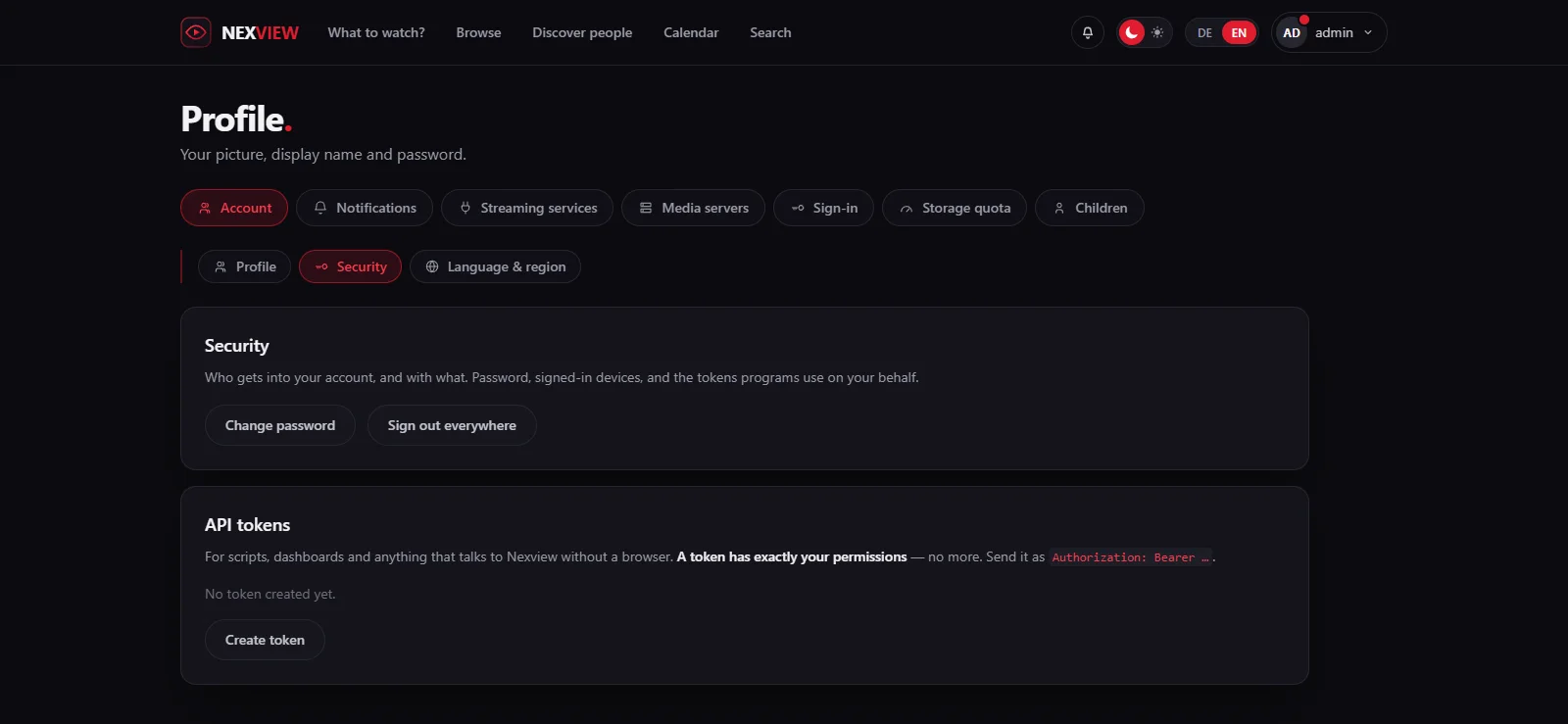
Good to knowThe token has to belong to an administrator, because instance state and disk space are the operator’s business. An ordinary account gets 403 here. “May only read” limits the token to GET, but an administrator may read the user list, the log and the settings. On your own machine that is fine. Before the token goes onto a screen that other people walk past, it is worth a second thought.
Honestly
What the dashboard is not.
Findings come from the state of the last round, not from a query when you open the page. Only “Playing now” asks the media servers live.
The thresholds are fixed. If you want a different limit, you change it in the source.
The dashboard shows what there is to do. How things develop is in the statistics.
Approvers and users see neither the page nor the badge. The token for the tile needs an administrator too.