Running it · Chapter 14
Backups and updates.
Before every change to the database Nexview writes a copy of its own. That copy sits in the same directory as the database, though: if the disk is lost, it goes with it. It only becomes a backup once you download it and keep it somewhere else. This chapter shows how that works, how you restore and how updates run.
What belongs to Nexview
Everything that matters lives in the folder you mounted as /data:
| File | Contents |
|---|---|
nexview.db | accounts, requests, feedback, settings |
secret.key | the key your stored credentials are encrypted with |
avatars/ | profile pictures |
trash/ | the fetched TRaSH guides your quality profiles were built against |
hausordnung/ | the images used in the house rules |
logs/ | the error log |
secret.key belongs with the database. Without it the stored credentials for TMDB, nexcrate or Radarr and Sonarr, and the mail server cannot be decrypted. Back both up together, and never put the backup in a public repository. Nexview’s own backups (see below) contain all of it. The list here is for whoever backs up the folder by hand.
Creating and downloading a backup
You find them under “Settings › System › Backups”.
- Create
“Back up now” takes a few seconds and does not disturb anything that is running. With the “Note (optional)” you write down what the backup is for. “Before the big cleanup” will help you more in three months than a date.
- Download
“Download” asks for a “Password for the archive” of at least eight characters, twice. You get an encrypted ZIP with the database, the profile pictures, the state of the TRaSH guides, the house-rules images and the key file
secret.key. Caches are left out, Nexview fetches them again by itself, which is why a backup is a few megabytes in size. Remember the password: there is no second key and no way back. The archive is an ordinary AES ZIP and opens with 7-Zip, WinRAR or your file manager. You do not depend on Nexview running to get at your own data.
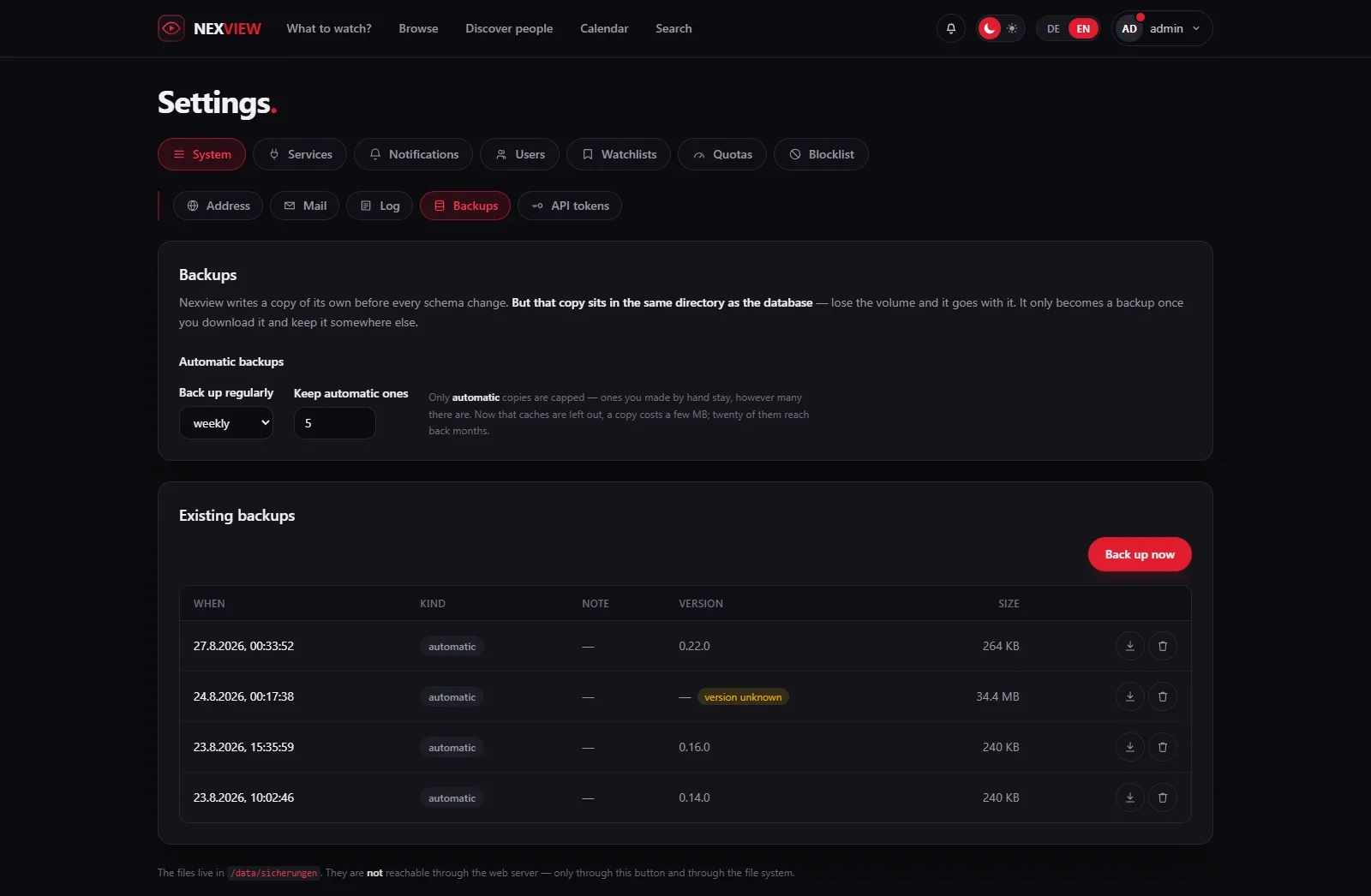
Regularly, by itself
Under “Automatic backups” you set “Back up regularly”: “off”, “daily”, “weekly” or “monthly”. Automatic copies are marked “automatic”, ones made by hand “by hand”. “Keep automatic ones” sets how many are kept, the default is five. Only automatic copies are capped, ones made by hand stay. Nexview works out whether one is due from the date of the existing files, so a container that was off over the due date catches up at the next start.
Good to knowThe copies Nexview keeps for itself in the data folder lie there unencrypted, as plain SQLite files. Whoever can read that directory can read every account, also from every older copy still kept. Only the download is encrypted. If that matters to you, protect the directory, not the file: a backup that Nexview alone could decrypt would have to keep the key next to it and protect nobody.
Restoring
- On a fresh installation. That is the way after a move or a failure. The wizard’s first question reads “Restore from a backup”. You upload the archive (“Backup archive (.zip)”), enter the password and choose “Check archive”. Nexview first looks at what is inside: time, version, note. Nothing is restored until your click on “Restore now”. After that the setup is done, accounts, requests and connections come from the backup.
- On the running installation. “Restore …” on the “Backups” page replaces the entire database. Everything that has happened since that backup is lost: accounts, requests, ratings, watchlists. Everyone who is signed in is signed out, you included. That is intended, because the accounts in the backup may be different from those of a moment ago. Nexview writes a backup of the current state first, which is the way back.
Beforehand Nexview checks whether the backup fits. Nexview can only carry its database forward: an older backup it brings up cleanly at start, a newer one it refuses, because it comes from a version whose tables the running one does not know. Update first in that case. The refusal gives the reason.
Two warnings in the window are meant seriously. If NEXVIEW_SECRET_KEY is set as an environment variable, it wins, and the key inside the archive is ignored. If its value differs from the one the backup was made with, none of the stored credentials can be read afterwards and everything has to be connected again. And: only Nexview is rolled back. Whatever has happened in nexcrate, Radarr, Sonarr or on the media server in the meantime stays as it is, deleted movies do not come back. The next sync brings Nexview in line with reality and may cancel requests again, notifications included.
A backup covers Nexview, not your library. Films and shows live where nexcrate or Radarr and Sonarr put them, and for that you still need whatever you use for it anyway.
Updating
An update means fetching a new image and restarting:
docker compose pull
docker compose up -d
The database is kept. Nexview brings it up to date itself on start: missing tables, columns and indexes are added. Before anything is changed it writes a copy to /data/sicherungen/, and the five most recent stay. The latest copy taken before an update is never rotated out, it is the way back to the version you came from.
The page “About Nexview”, which you reach through “About” in the footer, shows the “Installed version”. It also shows when a newer one exists (“Update available”), and “What’s new?” leads to the release notes. For that Nexview asks GitHub at most once a day. The request sends nothing out of Nexview, and you switch it off there with “Look for new versions daily”. The release notes of every version are also on GitHub. Nexview never updates itself.
If you want no surprises, write a fixed version instead of latest into image::
| Image | Contents |
|---|---|
ghcr.io/derkezorm/nexview:latest | the latest released version, the recommendation |
ghcr.io/derkezorm/nexview:1.1.0 | exactly that version, never changes |
ghcr.io/derkezorm/nexview:main | the current development state, may be broken |
On Unraid and TrueNAS you update from the catalogue, see Self-host.
Going back to an older version
Do not simply start the older image on the updated data folder. An older version cannot read what a newer one has written, and it changes data without saying so: it cancels open requests, drops 4K rights and rebuilds storage entries. An older 1.x version therefore refuses to start before it changes anything. The way back is the backup taken before the update. It sits in sicherungen/ and carries “before update” in its name, and the start log of the update names the exact file. Take that file and not a newer one: an older version started on the updated database writes a backup of its own first, and that already holds the new data.
Going back works by swapping the file while Nexview is stopped, not through “Restore” in the settings:
- Stop
Stop the container:
docker compose down. - Replace the file
In the data folder, copy that backup over
nexview.db. - Remove leftovers
Delete
nexview.db-walandnexview.db-shmif they exist. They belong to the newer database and would be replayed onto the old one. - Start the old version
Set the older version in
image:, for exampleghcr.io/derkezorm/nexview:1.1.0, and start withdocker compose up -d.
Everything done since the update is not in that backup and is gone on the old version. Updating again later starts from the restored state and runs the update once more.
Next comes an integration that uses much of this: Home Assistant. All environment variables are on the Self-host page.