Day to day · Chapter 8
Quotas and storage.
“Three films a week” sounds fair until one of them is 60 gigabytes. So Nexview has two limits that always both apply: how much someone may request, and how much space they may take up doing it. Out of the box Nexview limits nobody, the defaults are set to “unlimited”. A fresh installation therefore measures without refusing anyone anything.
Two limits that both apply
- The item count counts requests, separately for movies and series. The period is a calendar period: since midnight, since Monday or since the first of the month, and it is set once for the whole house. The quota renews itself, so waiting helps against a full week. Declined and failed requests cost nothing, and a cancelled one frees its place again.
- Storage measures the space taken, in GB. It never renews, because the space is taken. Only clearing up helps against a full account. Films count whole, shows season by season, nothing finer is ever counted. A season is charged only once it has fully downloaded. The same file in Full-HD and in 4K is two files and therefore two entries.
A request goes through only if both still have room, and the message says which limit applied. To limit by space only, set the item counts to “unlimited”, and the other way round. The item count is checked first, because against it all you can do is wait. A block through storage applies only once the account has reached the limit: whoever still has room may request, even if that takes them past it. Nobody can know beforehand how big a file will be, and a block based on a guess would be arbitrary.
Setting the limits
Under “Settings › Quotas” are the “Defaults”: “Movies”, “Series” and “Storage” (in GB), plus the “Period for the item count” with “per day”, “per week” or “per month”. They apply to every account that carries nothing of its own, so a new account is set up correctly without a finger lifted. You refine them per account under “Settings › Users” with “Edit”. There are three states: “Default” (the house value applies), “own value” and “unlimited”. A 0 means “may not request anything”, not “unlimited”. Administrators have no quota; whatever they fetch belongs to the house. The same page shows the usage by account. Clicking an account shows its individual titles.
Good to knowStart generous, or leave the values empty and just measure. After a few days the usage by account shows what is realistic, and you derive the limit from real numbers instead of guessing.
Personal account and house stock
Space is not used up like a credit, it is taken up jointly. A personal storage account is therefore always an agreement, and Nexview makes it honest:
- The personal account covers what this person requested and still claims.
- House stock belongs to nobody and counts against nobody. Everything that was already in the library falls there, so every account starts at zero. To that comes what the operator takes over on purpose.
The sizes come from whatever procures, that is nexcrate or Radarr and Sonarr, without extra requests and without a filesystem scan. The media server only keeps measuring what was there once; what only it knows does not count. If the attribution has grown crooked, the “Quotas” page has the button “Move everything to the household”. It sets every account to zero. A dialogue first names the real numbers, how many titles with how many GB move to the house. Files are never touched, only who they are charged to changes.
What each person sees
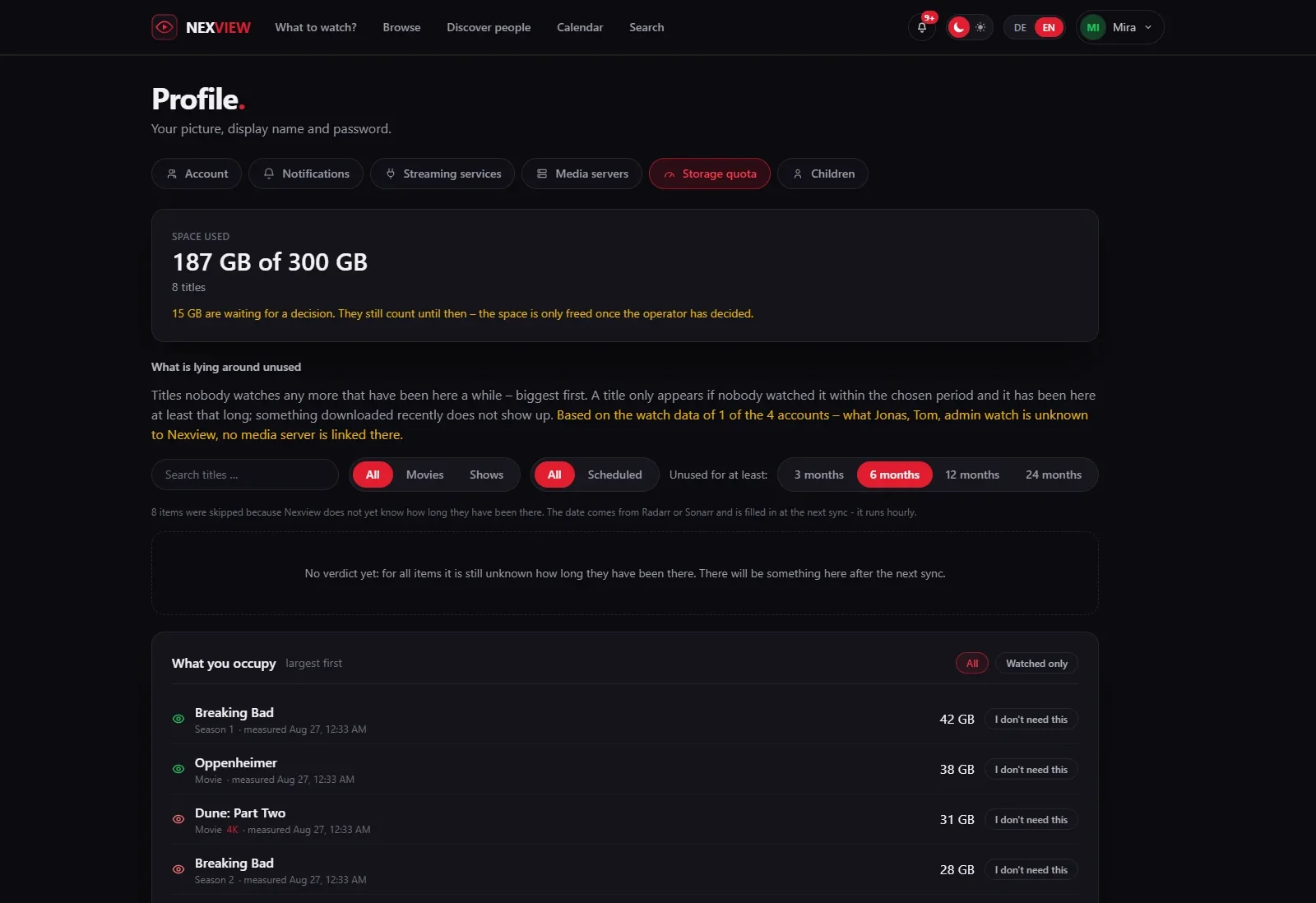
In the profile the tab “Storage quota” shows one’s own state: “Space used” against the limit, below it every title, largest first. Long lists have search and pages. Every title carries an eye, green for watched and red for not yet, and for seasons green means all episodes watched. If the account is not linked to the media server, Nexview shows a question-mark eye with the reason. Whoever has reached the limit reads “You are over your limit. Until you free up space you cannot request anything new.” Viewing, handing back and the watchlist carry on.
Handing back and rebooking
You make room with “I don't need this”. For a season Nexview asks for the wish: “Have it deleted” frees the space, “Keep, stop downloading” leaves the episodes in place and only ends further downloading, so the title keeps counting but no longer grows. Handing back does nothing yet. The title stays on disk and keeps counting until the operator has decided, otherwise one would hand everything back and be free at once. A misclick can be taken back with “Keep after all”.
The operator sees the hand-back under “Waiting for your decision” with the wish on the row and has three outcomes:
- “To the house” rebooks the title. It then counts against nobody, and the file stays untouched.
- “Delete” shows the actual file list first and is the only step with no way back. With a recycle bin the file goes there and can be brought back.
- “Stop following” leaves the episodes in place and only ends further downloading.
The person concerned gets the result as a notification.
The recycle bin
Deleting goes only through nexcrate or through Radarr and Sonarr, because Nexview never sees the filesystem. The recycle bin therefore lives with them.
- With nexcrate Nexview shows the recycle bin in the “Recycle bin” section of the “Quotas” page, with “Restore” for each file. The chapter nexcrate or Radarr and Sonarr describes it.
- With Radarr and Sonarr you set it up on the same page under “Recycle bin”: “Use a recycle bin” with “Keep for” in days. Without it Radarr and Sonarr delete for good, and the dialogue on deleting says beforehand which case applies. The recycle bin belongs to those two programmes, the setting applies over there to everything, including deletions that have nothing to do with Nexview. Nexview cannot restore from it, that only works there.
Titles have to stay
Nexview deletes only through whatever procures. If someone removes a title there and keeps the file, they create something Nexview still counts, because the media server knows it, but can no longer remove. The requester is then stuck with a charge they can only hand to the house stock. That happens in a common workflow: Radarr as a pure download machine, where a film is removed once the quality profile has reached its maximum. With that workflow the storage quota no longer works. Whoever works like that is better off limiting by item count only. The “Quotas” page warns about it in a red box.
Clearing up what nobody watches
The list “What is lying around unused” shows titles that nobody has watched for a long time. The operator finds it for the whole house under “Statistics & analysis › Library”, each person for their own titles in the profile’s storage quota. It lists the largest first, with space needed, last watched and who the title is charged to. The period can be set from three months to two years. A title appears only if nobody watched it within the period and it has been here at least that long. More on the Statistics page.
When an account leaves
Users and approvers do not delete their account themselves, they request it in the profile, and the request reaches the operator as a ticket. When deleting, the operator decides about the holdings title by title: a tick means to the house, without a tick it is deleted. What the dialogue looks like is in the chapter Accounts and roles.
Next come the children’s accounts: Child accounts.