Getting started · Chapter 4
Services and ratings.
Nexview talks to services that supply titles and to programmes that procure them. You enter all the credentials in the interface, not in a configuration file. They are stored encrypted in the database and never leave the server. This chapter walks through the page “Settings › Services” and explains where titles, ratings and streaming hints come from.
The Services page
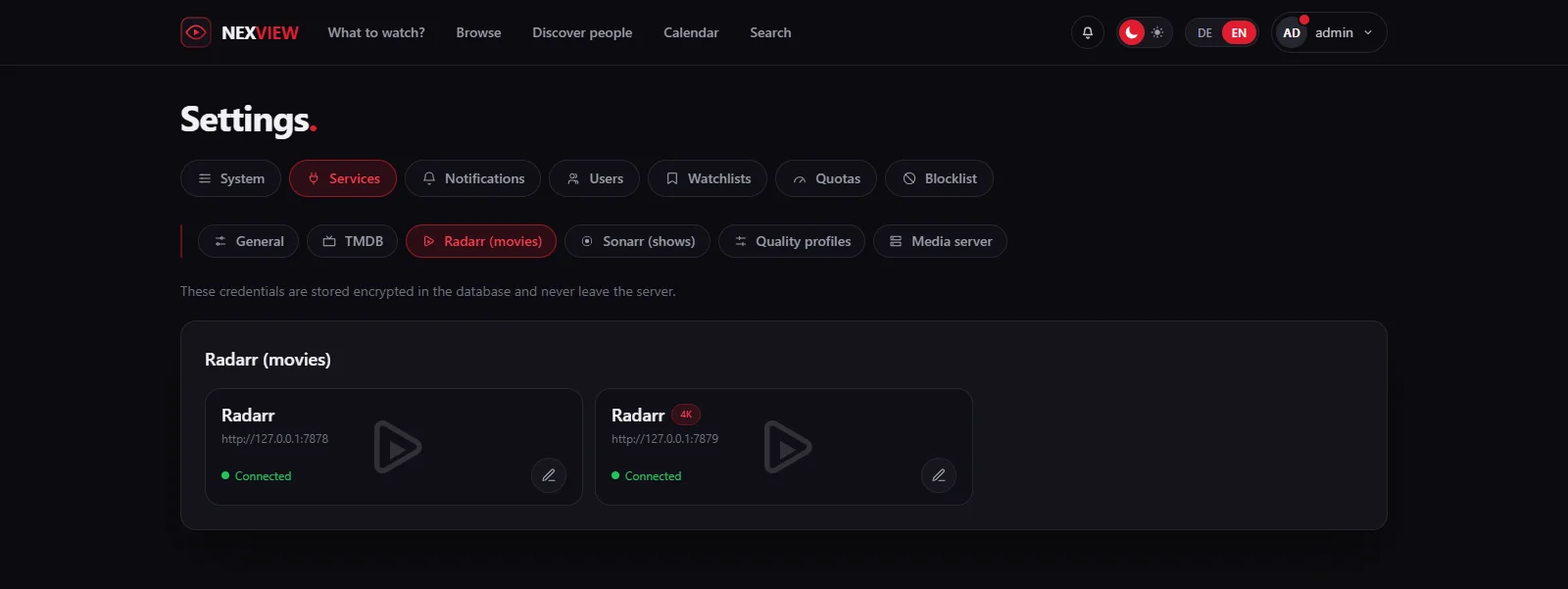
At the top there are tabs: “General”, “TMDB”, depending on the mode “Radarr (movies)” and “Sonarr (shows)” or “nexcrate”, then “Quality profiles” and “Media server”. Each connection is a tile with its state: “Connected”, “Unreachable”, “reports problems” or “not set up”. The pencil opens the form. A key that has been saved is never shown again. If you leave the field empty it stays as it is, and “Remove key” deletes it.
TMDB
TMDB supplies everything you see in Nexview: titles, posters, descriptions, casts, dates. The key is free. Create an account at themoviedb.org and generate a key under “Settings › API”. In Nexview you enter it under “Settings › Services › TMDB” at “TMDB API key”. “Test connection” tells you at once whether it works, instead of you finding out from empty pages.
Without a key Nexview runs in sample mode with invented titles. That is enough to look around but not to request, because the titles do not exist. When sample data appears is decided by “Sample data” under “General”. Out of the box it is “Automatic (only without a TMDB key)”.
Ratings from IMDb, Rotten Tomatoes and Metacritic
TMDB knows only its own rating. The big portals’ ratings come from whatever procures for you, without another service to enter in Nexview. For movies it works like this:
- With Radarr Radarr delivers the ratings along with the film, even for films that are not in the library at all.
- With nexcrate they come from nexcrate. There it needs an OMDb key of your own. Without one Nexview shows no portal rating, and nothing appears as an error.
For shows there is no such breakdown, so the portal ratings are limited to movies. Ratings are a side dish: if the source does not answer, the page still appears, just without them. What your household says about the quality of a file is something else: the stars under “How was the quality?” and the tickets. Both are in the chapter Notifications.
Where a title is streaming
The detail page shows which providers carry a title in your region right now, split into subscription, free, rent and buy. The data comes from JustWatch and needs no key from you. The region decides: everyone can choose theirs in their profile, and whoever has not gets the operator’s default from “Settings › Services › General”.
The other connections
- nexcrate, Radarr and Sonarr. Address, key, 4K instance and webhook are in the chapter nexcrate or Radarr and Sonarr.
- Plex, Jellyfin and Emby. They are in the chapter Connect your media server.
- Notifications. For the whole installation there are ntfy, Gotify, Telegram, Discord, a plain webhook, Apprise and e-mail. You set them up under “Settings › Notifications”, not here. The chapter Notifications describes it.
- Mail server and address. You entered both in the wizard. You find them under “Settings › System › Mail” and “Settings › System › Address”. The “Mail” page also sends a test message to an address of your choice.
- Home Assistant. The integration runs in Home Assistant and needs only a personal key from Nexview, see Home Assistant.
When something sticks
Check three things first.
- The connection fails
Almost always it is the address as seen from the container. If Nexview runs in a container,
localhostis the container itself and not your machine. Use the address on your network, or the service name if both share a Docker network. A quick test from inside the container settles it faster than any guess. - No profiles appear in the list
Then Radarr answers but the key is wrong. With a wrong key Radarr returns no error message, just an empty list.
- Invitations do not arrive
Usually the public address or the mail server is missing. Both are under “Settings › System › Address” and “Settings › System › Mail”. The log under “Settings › System › Log” shows what went wrong.
Good to knowIf Nexview says that stored credentials can no longer be read, usually NEXVIEW_SECRET_KEY was changed, or the file data/secret.key was lost when the container was recreated because it was not in the mounted folder. You then enter the affected credentials once more. Keep the key safe for good, or it will happen again at the next update. More in the chapter Backups and updates.
Next come the people in the house: Accounts and roles.